

What Drivers and Software Do I Need to Set Up the USB-RTD High-Speed Programmer for LCD Driver Board on Windows
2026-11-16
Setting up a reliable flashing environment on Windows begins with understanding the exact driver stack and software chain required by your hardware. The USB-RTD High-Speed Programmer for LCD Driver Board from SKY-TDM is designed to communicate with RTD-series scaler chips over USB, but it depends on a correctly installed USB-to-serial bridge driver, a compatible RTD flashing utility, and the right firmware package. Without these three layers in place, even the fastest programmer will fail to detect the target board. This guide explains each component, the recommended versions, and the installation order that SKY-TDM engineers use during production and field service.
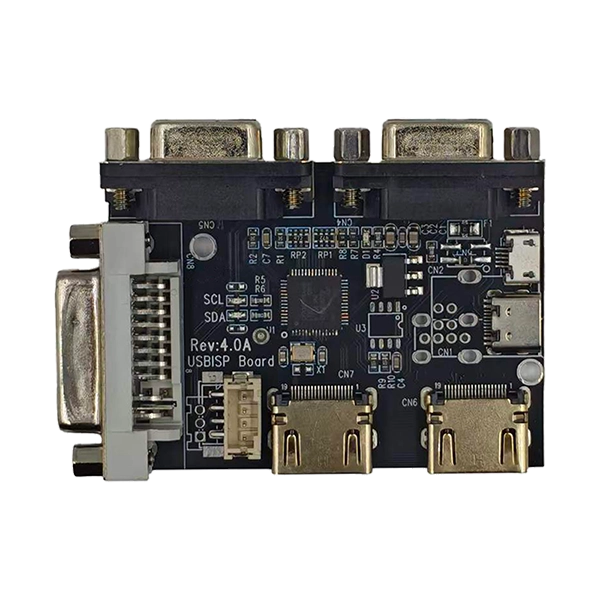
Core Software Stack Overview
The USB-RTD High-Speed Programmer for LCD Driver Board operates through a layered software architecture. Each layer must match the hardware revision and the RTD chip family on your LCD driver board.
| Layer | Component | Typical Version | Purpose |
|---|---|---|---|
| 1 | USB Bridge Driver (CH341/VCP or FTDI) | CH341SER 3.5+ / FTDI VCP 2.12+ | Establishes COM port communication |
| 2 | SKY-TDM Programmer Utility | RTD Flash Tool 3.x | Sends read/write/erase commands |
| 3 | RTD Firmware Package (.bin/.hex) | Board-specific | Target firmware image |
| 4 | RTD Chip Configuration File | RTD2556/RTD2270/RTD2795 profiles | Defines SPI flash mapping |
The SKY-TDM utility ships with pre-configured chip profiles, which reduces the risk of incorrect SPI addressing during firmware recovery.
Driver Installation: Step-by-Step
-
Download the official USB bridge driver from the SKY-TDM support portal. Avoid third-party driver packs, which often install mismatched VCP versions.
-
Disconnect the USB-RTD High-Speed Programmer for LCD Driver Board before installation.
-
Run the installer as administrator and complete the setup.
-
Reconnect the programmer and open Device Manager. A new COM port should appear under "Ports (COM & LPT)."
-
Confirm the COM number, as the SKY-TDM utility requires manual port selection on some Windows builds.
| Windows Version | Driver Package | Known Notes |
|---|---|---|
| Windows 10 (21H2+) | CH341SER 3.5 | Native signed driver, no reboot needed |
| Windows 11 | FTDI VCP 2.12.36 | Recommended for stable high-speed transfers |
| Windows 7/8.1 | CH341SER 3.4 | Legacy signature enforcement may require manual approval |
Software Configuration and First Flash
After the driver is verified, install the SKY-TDM RTD Flash Tool and load the correct chip profile for your board. The USB-RTD High-Speed Programmer for LCD Driver Board will auto-detect the SPI flash ID; if detection fails, check the ribbon cable orientation and the 3.3V/1.8V jumper setting.
| Setting | Recommended Value | Reason |
|---|---|---|
| SPI Clock | 12 MHz (default) | Balance of speed and signal integrity |
| Verify After Write | Enabled | Confirms firmware integrity |
| Erase Mode | Chip Erase | Prevents residual block errors |
| Power Mode | External 3.3V | Avoids USB current limits |
FAQ
Q: Which driver should I install first for the USB-RTD High-Speed Programmer for LCD Driver Board?
A: Install the USB bridge driver (CH341 or FTDI VCP) before connecting the programmer, then install the SKY-TDM RTD Flash Tool; this order ensures Windows assigns a stable COM port and the utility can enumerate the device without conflicts.
Q: Can the USB-RTD High-Speed Programmer for LCD Driver Board work on Windows 11 without a signed driver?
A: Yes, provided you use the SKY-TDM-recommended FTDI VCP 2.12.36 or CH341SER 3.5 package, both of which carry valid digital signatures and install without disabling driver signature enforcement.
Q: What software do I need to read and write RTD2556 firmware with the USB-RTD High-Speed Programmer for LCD Driver Board?
A: You need the SKY-TDM RTD Flash Tool 3.x, the RTD2556 chip profile, and the target .bin firmware; the tool handles SPI read, erase, write, and verify through a single interface.
Q: Why does the USB-RTD High-Speed Programmer for LCD Driver Board show "Device Not Found" in the software?
A: This usually indicates a missing or mismatched USB bridge driver, an occupied COM port, or a loose ribbon connection; reinstall the SKY-TDM driver package, reassign the COM port, and reseat the cable before retrying.
Q: Is additional firmware editing software required after flashing with the USB-RTD High-Speed Programmer for LCD Driver Board?
A: No, the SKY-TDM utility writes the firmware image directly to SPI flash; editing software is only needed if you must modify panel timing parameters before flashing.
Contact Us
For driver packages, chip profiles, and firmware files validated for the USB-RTD High-Speed Programmer for LCD Driver Board, contact the SKY-TDM technical team directly. Our engineers provide setup assistance, version matching, and troubleshooting for Windows environments, ensuring your LCD driver board recovery workflow runs reliably from the first flash.