

Article Summary
This guide explains how network cards work, the main types available, the differences between common network speeds, and the factors that influence purchasing decisions. It also covers installation, troubleshooting, and practical selection tips to help IT teams and procurement professionals build dependable network infrastructure.
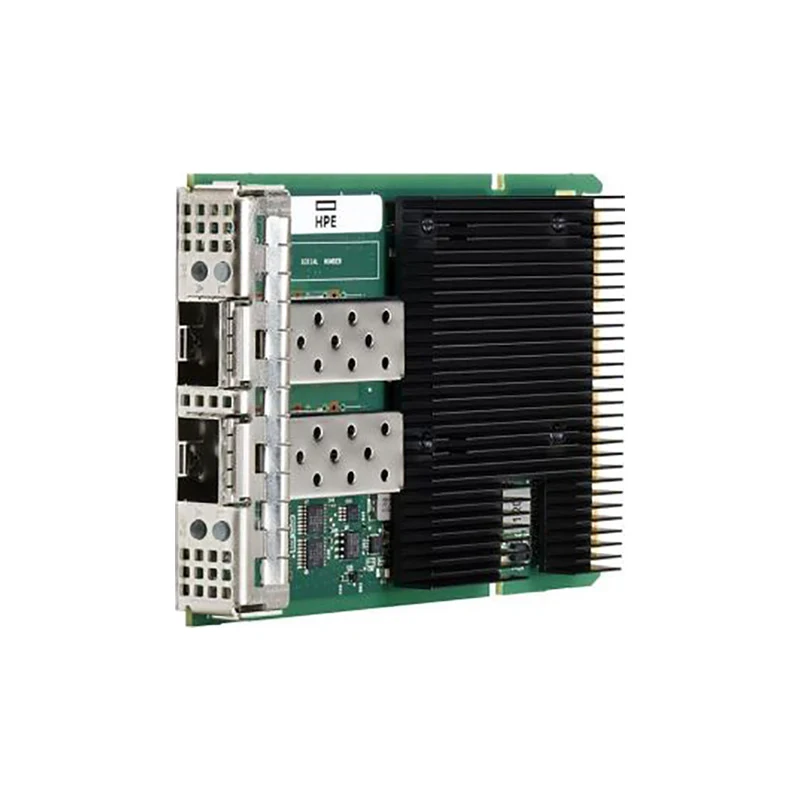
1. Understanding Network Cards
A network card, commonly called a network interface card (NIC), is a hardware component that enables a computer, workstation, or server to communicate with other devices over a network. It connects the system to Ethernet infrastructure, fiber-optic networks, or wireless networks, depending on its design.
Most modern computers include an integrated network interface on the motherboard. Dedicated network cards, however, can provide additional ports, higher bandwidth, specialized processing capabilities, and connectivity options that standard onboard interfaces may not support.
How Does a Network Card Work?
When an application sends information across a network, the operating system passes data to the network driver. The network interface processes the relevant network frames and transmits them through its physical or wireless connection. Incoming traffic follows the reverse path before reaching the operating system and the intended application.
Depending on the model, a NIC may support features such as checksum offloading, segmentation offloading, receive-side scaling, virtualization functions, and traffic prioritization. These capabilities can reduce CPU overhead or improve packet processing under suitable workloads.
Key Components of a Network Card
- Network controller: Manages communication between the host system and the network.
- Host interface: Connects the card to the computer, commonly through PCI Express.
- Network ports: Provide Ethernet, fiber-optic transceiver, or other supported connections.
- Firmware and drivers: Help the operating system initialize and manage the hardware.
- Supporting circuitry: Handles signal transmission, processing, and power requirements.
Understanding these components helps buyers evaluate whether a network card fits their system instead of relying solely on advertised bandwidth.
2. Why Network Cards Matter for Business Performance
Network infrastructure affects everything from file sharing and application responsiveness to database access and large-scale computing. An unsuitable network card can become a bottleneck even when switches, servers, and storage devices are capable of higher performance.
Higher Data Throughput
Suitable high-speed interfaces can improve the transfer of large files, datasets, backups, and virtual machine images when the rest of the network can support the additional bandwidth.
More Predictable Latency
Appropriate hardware and configuration can help reduce processing delays, especially in environments that depend on fast communication between servers.
Improved Reliability
Multiple ports, supported teaming configurations, and redundant network paths can help reduce the impact of individual link failures.
Better Resource Utilization
Hardware offloading and virtualization support may reduce processing overhead and help systems handle demanding network workloads more efficiently.
It is important to remember that installing a faster NIC does not automatically accelerate every application. Switch capacity, cable quality, storage speed, CPU utilization, software configuration, and the performance of the remote endpoint all influence real-world results.
3. Common Types of Network Cards
Network cards are available in different physical formats and connection technologies. The best option depends on the equipment being connected, the operating environment, and the required performance.
Ethernet Network Cards
Ethernet NICs are widely used in offices, enterprise servers, industrial networks, and data centers. Depending on the model, they may provide copper RJ45 ports or interfaces designed for fiber-optic transceivers and direct-attach cables.
Copper Ethernet can be convenient for existing structured cabling, while optical connections are frequently selected for longer distances or higher-speed links. Actual supported distances depend on the interface, cable category, transceiver, and environmental conditions.
Fiber-Optic Network Cards
Fiber-capable network cards support optical networking through compatible transceivers or integrated optical interfaces. They are useful for data center connections, high-bandwidth storage networks, and links between network equipment.
Compatibility must be checked carefully. The port type, optical wavelength, fiber type, transceiver specification, and supported link speed should match the connected equipment.
Server and Data Center Network Cards
Server-grade NICs are designed for demanding workloads, including virtualization, cloud services, high-performance computing, and distributed storage. Selected models support multiple high-speed ports, advanced traffic processing, and virtualization technologies.
Wireless Network Adapters
Wireless adapters connect devices to Wi-Fi networks without requiring a physical Ethernet cable. They are useful for laptops, compact computers, and environments where wired connections are inconvenient. In server rooms and performance-critical installations, wired networking is often preferred for predictable latency and consistent bandwidth.
Specialized Network and Storage Adapters
Some adapters are optimized for particular workloads. SmartNICs may offload networking or infrastructure tasks, while specialized storage adapters support protocols and functions associated with storage connectivity. A Fibre Channel host bus adapter, for example, serves a different purpose from a standard Ethernet NIC, even though both provide connectivity.
4. Network Speeds and Interface Compatibility
Bandwidth is one of the most visible specifications when comparing network cards, but the advertised rate is only one part of the decision. The host slot, switch port, cable, transceiver, and remote interface must all support a compatible connection.
| Nominal Link Speed | Typical Use Cases | Important Considerations |
|---|---|---|
| 1GbE | Office systems, basic server connectivity, general business networks | Check whether existing infrastructure already meets application demands. |
| 10GbE | Virtualization hosts, faster file services, departmental servers | Verify cabling, switch compatibility, and actual workload requirements. |
| 25GbE | Dense server racks, storage traffic, modern data center deployments | Confirm adapter, transceiver, and switch support for the intended link. |
| 40GbE | High-throughput aggregation and selected data center environments | Check port configuration, cabling, and available switch capacity. |
| 100GbE | High-performance computing, AI clusters, and demanding data center networks | Consider PCIe bandwidth, cooling, optics, and traffic patterns. |
| 200GbE and above | Advanced computing clusters and high-density network fabrics | Confirm end-to-end compatibility and the platform's supported configuration. |
These categories are illustrative rather than universal recommendations. Requirements vary by application, network topology, and hardware generation. Higher-speed cards may use different connector designs and host interface requirements, so physical fit alone is not proof of compatibility.
5. How to Choose the Right Network Card
For IT managers, system integrators, and procurement teams, the main challenge is finding a card that satisfies technical requirements without introducing unnecessary expense or compatibility risks. A structured evaluation helps prevent costly purchasing mistakes.
Step 1: Identify the Server or Computer Platform
Check the manufacturer's documentation for supported network adapters, available PCIe slots, slot widths, firmware requirements, and physical clearance. A card may fit mechanically but still be unsuitable because of power, cooling, or platform limitations.
Step 2: Define Bandwidth and Port Requirements
Estimate the network traffic generated by applications, users, storage systems, and virtual machines. Consider both total bandwidth and the number of physical connections. A dual-port card may be useful for separate networks, supported redundancy, or workload distribution.
Step 3: Confirm the Connection Medium
Determine whether the installation requires copper Ethernet, optical transceivers, or direct-attach cables. Check connector types, cable specifications, link distance, and supported transmission rates before placing an order.
Step 4: Verify Drivers, Firmware, and Operating System Support
Review support for the target operating system, hypervisor, and firmware version. Enterprise deployments should also consider lifecycle management, monitoring capabilities, and the availability of validated driver packages.
Step 5: Evaluate Advanced Features
Depending on the workload, useful features may include:
- TCP and UDP checksum offloading.
- Receive-side scaling and multi-queue processing.
- SR-IOV and other supported virtualization functions.
- Network teaming, bonding, or link aggregation support.
- Traffic prioritization and remote management capabilities.
- Support for the intended Ethernet or storage networking protocol.
Feature availability varies by adapter, driver, operating system, and configuration. Verify the specific functions required instead of assuming every card offers the same capabilities.
Step 6: Compare Total Cost of Ownership
The purchase price is only one cost. Compatible optics, cables, switches, installation labor, power consumption, cooling, and maintenance can influence the total investment. A slightly more expensive compatible card may offer better long-term value if it reduces deployment complexity or supports a planned upgrade path.
6. Where Network Cards Deliver the Greatest Value
Different industries place different demands on network infrastructure. Matching the adapter to the actual workload is more effective than selecting hardware based on bandwidth alone.
Data Centers and Cloud Computing
Cloud platforms rely on fast, consistent communication among compute nodes, storage systems, and network switches. High-speed NICs can support server consolidation, distributed applications, and greater traffic capacity when the surrounding infrastructure is designed accordingly.
Artificial Intelligence and High-Performance Computing
AI training and scientific computing often require frequent communication among multiple accelerator-equipped servers. Suitable high-speed network adapters can support these data exchanges. The choice should account for communication patterns, topology, congestion management, host bandwidth, and compatibility with the software stack.
Enterprise Storage and Virtualization
Virtualized servers may handle traffic from many virtual machines simultaneously. Multiple queues, virtualization support, and sufficient bandwidth can help manage these workloads. Storage networks also require careful protocol and latency considerations to avoid creating bottlenecks.
Telecommunications and Network Infrastructure
Telecommunications environments need dependable connectivity between servers, management systems, and network devices. Appropriate adapters help support equipment integration, data processing, and network service delivery.
Industrial and Business Networks
Industrial computers, monitoring systems, and business applications depend on stable data communication. Environmental conditions, operating temperatures, long-term availability, and support requirements may be just as important as raw link speed.
7. Network Card Installation and Configuration
Correct installation helps protect hardware and reduces avoidable downtime. Enterprise systems should follow the server manufacturer's maintenance procedures, especially when components are installed in equipment that supports critical workloads.
Before Installation
- Confirm that the adapter is supported by the target system.
- Back up relevant configuration information and plan for downtime.
- Shut down the equipment and disconnect power when required by the service manual.
- Use appropriate electrostatic discharge precautions.
- Check the slot, bracket, airflow, and clearance requirements.
After Installation
Secure the card according to the platform instructions, reconnect the required cables, and restore power. Install a compatible driver or firmware package when necessary. Then confirm that the operating system recognizes the adapter and that the intended ports are available.
Configure the correct IP addressing, VLAN settings, routing, and teaming or bonding options where required. Validate the negotiated link speed, test connectivity to the intended destination, and measure throughput under representative workloads.
For production servers, document the adapter model, firmware and driver versions, port assignments, MAC addresses, and relevant network settings. This information makes future troubleshooting and hardware replacement easier.
8. Common Network Card Problems and Solutions
Network failures can originate from the adapter, host system, cable, switch, driver, or network configuration. Checking the simplest causes first can reduce troubleshooting time.
| Problem | Possible Cause | Recommended Action |
|---|---|---|
| Adapter not detected | Unsupported hardware, poor seating, disabled slot, or driver issue | Check system logs, BIOS/UEFI settings, seating, and platform compatibility. |
| No network connection | Damaged cable, inactive switch port, or incorrect configuration | Inspect link indicators, replace the cable if needed, and verify switch settings. |
| Lower-than-expected speed | Negotiated link rate, congestion, driver settings, or remote limitations | Check link speed, error counters, traffic load, and end-to-end performance. |
| Intermittent disconnections | Loose connections, overheating, firmware issues, or unstable power | Review system logs, temperatures, cable condition, and supported firmware updates. |
| High CPU utilization | Heavy packet processing or unavailable offload features | Review driver capabilities, queue configuration, and workload behavior. |
| Virtual machines cannot communicate | VLAN, virtual switch, bonding, or virtualization configuration issues | Check virtual switch policies, port groups, VLAN tags, and supported adapter settings. |
A disciplined troubleshooting process should establish what changed before the problem appeared. Avoid updating multiple components at once in a production environment, because doing so can make the underlying cause more difficult to identify.
9. Maintenance and Long-Term Value
Network cards typically require little routine intervention, but enterprise equipment benefits from consistent monitoring and lifecycle management. Small issues can become larger outages when they go unnoticed.
Monitor Network Health
Track link status, packet errors, dropped packets, throughput, temperature where available, and other relevant system indicators. Establish a baseline under normal workloads so that unusual behavior can be identified quickly.
Manage Updates Carefully
Review vendor guidance for firmware and driver updates. Test changes in a controlled environment before applying them to critical systems, and retain a rollback plan whenever possible.
Maintain Physical Connections
Check cables, transceivers, port condition, and airflow during scheduled maintenance. Follow manufacturer handling instructions for optical components, and avoid exposing sensitive connectors to dust or damage.
Plan for Future Expansion
Consider expected traffic growth, new server deployments, storage upgrades, and changes to virtualization or AI workloads. Planning around a complete network architecture can prevent repeated purchases of adapters that become inadequate too quickly.
10. Frequently Asked Questions About Network Cards
1. What is the main purpose of a network card?
A network card allows a computer or server to send and receive data over a network. Depending on its design, it can provide Ethernet, fiber-optic, or wireless connectivity and may include additional processing or virtualization features.
2. Do all servers support the same network cards?
No. Servers differ in PCIe slot availability, physical clearance, firmware support, power limits, cooling requirements, and validated hardware configurations. Always verify compatibility with the specific server model.
3. Is a dedicated network card better than an onboard NIC?
Not in every situation. An onboard NIC may be sufficient for ordinary workloads. A dedicated adapter becomes useful when additional ports, higher speeds, specialized functions, or improved separation of network traffic are required.
4. Can a network card improve internet speed?
It can remove a hardware bottleneck if the existing adapter is limiting the connection. However, actual internet performance also depends on the service plan, router, switch, cabling, server performance, and external network conditions.
5. What is the difference between a NIC and an HBA?
A NIC generally connects a host to a data network, commonly Ethernet. A host bus adapter is designed to connect a host to a particular storage or interconnect system, such as a Fibre Channel storage fabric. Some products have overlapping capabilities, so the supported protocol and intended use should be checked.
6. How many ports should a network card have?
The answer depends on the network design. One port may be sufficient for a simple connection, while multiport cards can support separate networks, additional capacity, or redundancy when the operating system and network configuration are designed for those purposes.
7. Can different network card brands work in the same server?
Different brands may coexist when the server, operating system, drivers, and network configuration support them. Nevertheless, mixing models can increase management complexity. Check interoperability and vendor support before deploying different adapters together.
8. Why does a high-speed NIC deliver less throughput than expected?
Potential causes include a slower negotiated link, insufficient PCIe bandwidth, switch congestion, CPU limitations, storage bottlenecks, incompatible optics, or traffic patterns that do not use the available bandwidth efficiently. Test each part of the communication path.
9. Are network cards suitable for AI servers?
Yes. Appropriate network adapters are widely used in AI infrastructure to connect compute nodes, storage, and management systems. Selection should consider required bandwidth, latency, supported communication technologies, server compatibility, and the overall network design.
10. What information should I provide when purchasing network cards?
Provide the server or motherboard model, required speed, port count, connection type, operating system, preferred manufacturer or part number, quantity, and intended application. These details help narrow down compatible options and reduce purchasing errors.
Build a More Reliable Network with the Right Hardware
Choosing network cards is an important step in building a stable, scalable, and efficient IT infrastructure. The best solution balances bandwidth, compatibility, reliability, application requirements, and long-term operating costs. A careful evaluation of the server platform and the entire network connection helps organizations avoid bottlenecks and make better use of their hardware investments.
Telefly Telecommunications Equipment Co., Ltd. supplies computer hardware and communication equipment, including network cards, servers, storage-related products, and transceivers. Its product range includes solutions from recognized hardware brands for a variety of computing and networking environments.
Whether you are upgrading an existing server, sourcing components for a data center, or planning a new high-performance computing deployment, confirming the exact specifications before purchasing is essential.