

How to Connect HDMI, DP, VGA, and Type-C to an LVDS eDP Interface AD Board Simultaneously
2026-09-23
Modern industrial and embedded display systems often require multiple video sources to drive a single LCD panel. An HDMI and DP and VGA and Type C To LVDS EDP Interface AD Board from SKY-TDM solves this challenge by integrating four input standards into one compact controller. This guide explains how to connect all four interfaces at once, switch between them reliably, and avoid common signal conflicts. Whether you are building a medical monitor, a kiosk, or a custom laptop panel project, SKY-TDM boards are engineered for simultaneous multi-input operation.
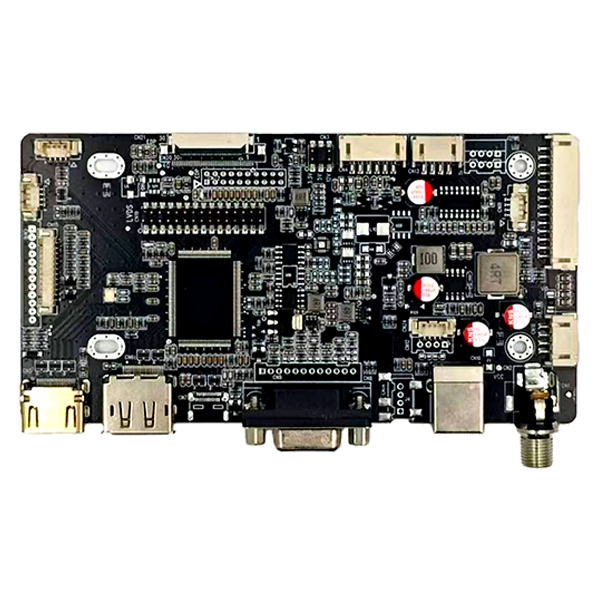
Understanding the Hardware Architecture
A typical HDMI and DP and VGA and Type C To LVDS EDP Interface AD Board contains a multi-port input stage, a scalar chip, and an LVDS/eDP output stage. The scalar handles input arbitration, so only one source is displayed at a time, but all four can remain physically connected. SKY-TDM designs use dedicated multiplexers to prevent hot-plug damage and EDID conflicts.
| Interface | Max Resolution | Audio Support | Hot-Plug Safe |
|---|---|---|---|
| HDMI 2.0 | 3840x2160 @ 60Hz | Yes | Yes |
| DisplayPort 1.4 | 3840x2160 @ 60Hz | Yes | Yes |
| VGA | 1920x1080 @ 60Hz | No | Yes |
| Type-C (DP Alt Mode) | 3840x2160 @ 60Hz | Yes | Yes |
Step-by-Step Simultaneous Connection
-
Power off all sources before cabling to avoid voltage spikes on the HDMI and DP and VGA and Type C To LVDS EDP Interface AD Board.
-
Connect the LVDS or eDP panel to the board's output connector. Verify pinout against your panel datasheet; SKY-TDM provides jumper settings for both 30-pin and 40-pin LVDS.
-
Attach HDMI, DP, VGA, and Type-C cables to their respective ports. Use certified cables for 4K signals.
-
Power the board with the recommended 12V DC adapter. SKY-TDM boards include reverse-polarity protection.
-
Use the on-board button, IR remote, or UART command to select the active input. The scalar auto-detects signal presence.
Input Priority and Switching Logic
SKY-TDM firmware allows configurable priority. For example, Type-C can override HDMI when a laptop is docked. The table below shows a typical default priority order.
| Priority | Input | Typical Use Case |
|---|---|---|
| 1 | Type-C | Mobile device docking |
| 2 | DP | Desktop GPU |
| 3 | HDMI | Media player |
| 4 | VGA | Legacy PC |
FAQ
Can an HDMI and DP and VGA and Type C To LVDS EDP Interface AD Board display four inputs at the same time?
No, it displays one active input at a time, but all four cables can remain connected for instant switching.
Does SKY-TDM provide EDID management for simultaneous connections?
Yes, SKY-TDM boards store separate EDID profiles for each input to prevent resolution conflicts.
What power supply does an HDMI and DP and VGA and Type C To LVDS EDP Interface AD Board require?
Most SKY-TDM models require 12V/2A DC; check the label for your specific revision.
Is VGA still useful on a modern LVDS eDP AD board?
Yes, VGA supports legacy industrial PCs and test equipment that lack digital outputs.
Can I use a USB-C phone to drive an LVDS panel through this board?
Yes, if the phone supports DP Alt Mode; otherwise use a SKY-TDM adapter with HDMI output.
Contact Us
Ready to integrate a reliable multi-input controller into your display project? Contact SKY-TDM today for datasheets, sample units, and custom firmware. Our engineers will help you select the right HDMI and DP and VGA and Type C To LVDS EDP Interface AD Board for your resolution, panel type, and environmental requirements.