

How Does PM OLED Contrast Performance Improve Readability in Low-Light Environments?
2026-11-23
PM OLED contrast performance plays an important role in how clearly users can read information on compact electronic devices when ambient light is limited. Unlike conventional LCD technology, which relies on a backlight to illuminate the display, an OLED pixel produces its own light. Individual pixels can switch off completely when displaying black content, creating a strong visual distinction between illuminated characters and dark areas. This characteristic is particularly useful for smart locks, portable medical equipment, audio devices, industrial meters, and other products that require clear information without a large display panel.
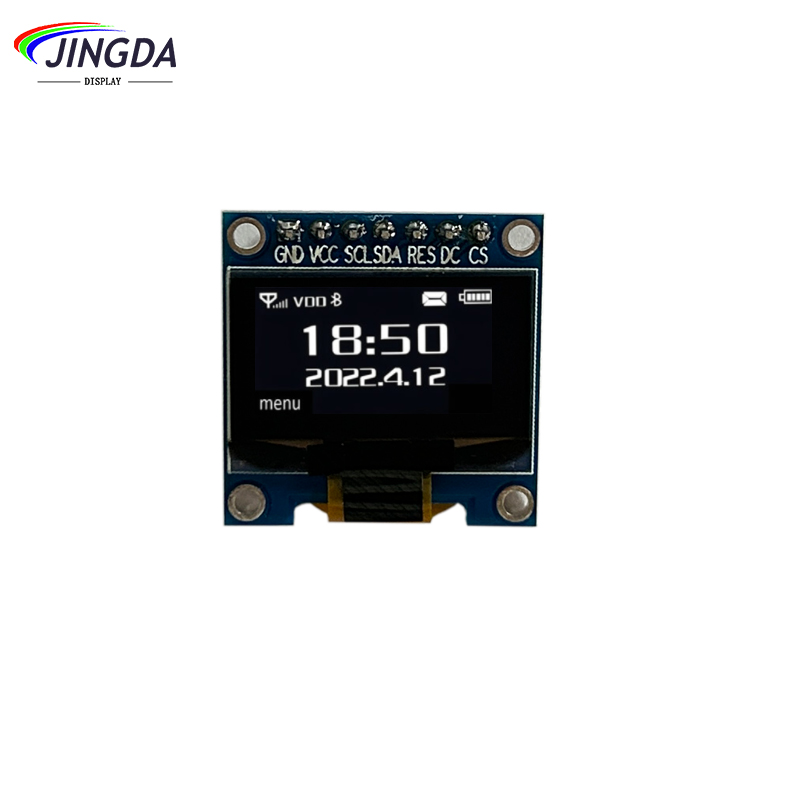
How Does Pixel-Level Emission Create Stronger Contrast in Dark Environments?
Display contrast describes the difference in luminance between the brightest white and the darkest black that a screen can produce. A higher contrast ratio generally makes text, icons, and interface elements easier to distinguish. In a low-light environment, this difference becomes especially noticeable because users are often looking at a small screen from a relatively short distance.
Traditional LCD panels use a backlight to illuminate liquid crystal pixels. Even when a pixel is instructed to display black, the liquid crystal layer cannot always block every part of the backlight. A small amount of light may pass through the panel, making black areas appear dark grey rather than completely black. This effect can reduce the visual separation between text and its background, particularly when the interface contains small characters or fine graphic details.
OLED technology works differently. Each pixel generates its own light, so a pixel displaying black can be switched off instead of relying on a separate backlight to create a dark appearance. This allows the display to produce very deep blacks and a high contrast ratio. When white text appears against a black background, the illuminated characters stand out clearly while the surrounding pixels remain dark.
For compact electronic products, this distinction has practical value. A meter displaying a numerical reading, for example, needs to present digits that can be identified quickly. Strong contrast helps separate each character from the background and reduces visual ambiguity. The same principle applies to status icons, battery indicators, menu labels, and warning messages.
In our display development work, contrast is considered alongside resolution, screen dimensions, brightness, and interface requirements. A display should not be selected by contrast specifications alone. The actual reading experience also depends on character size, viewing distance, ambient lighting, display settings, and the design of the user interface.
Why Is High Contrast Useful for Reading Small Text at Night?
Low-light readability is not simply a matter of making a screen brighter. Excessive brightness in a dark room can create glare and make a small display uncomfortable to view. A well-designed interface needs enough luminance to make information visible while maintaining a clear distinction between foreground content and the background.
With self-emissive pixels, dark interface areas do not need to remain illuminated. This makes it possible to display bright text and symbols against a black background without lighting the entire screen. For devices used at night, this visual arrangement can provide a clear information area while limiting unnecessary illumination from unused parts of the panel.
Consider a portable medical device that shows a measurement, operating status, and several control icons. If the display uses a dark background with clearly illuminated characters, users can identify the primary reading without having to interpret a large area of bright content. The display designer can also use different text sizes and spacing to establish a clear information hierarchy.
The same approach is relevant to smart locks and access control products. A user may need to check a number, confirm a selection, or read a short instruction in a dim entrance area. High contrast can make these interface elements easier to distinguish, provided that the font size, character spacing, and brightness have been properly configured.
Our engineering team considers the intended viewing conditions when reviewing display requirements. For example, a device installed in a bedroom may need a different brightness setting from an industrial meter used in a workshop. A dark background can support a restrained interface, but the final result still depends on appropriate brightness control and readable graphic design.
Which Technical Specifications Influence Low-Light Display Readability?
Contrast is an important performance factor, but it is only one part of display selection. Engineers should also evaluate resolution, module dimensions, driver compatibility, communication interfaces, operating temperature, and mechanical restrictions. These details determine whether a display can deliver the required information clearly while fitting the electronic and structural design of the finished product.
Our standard module range covers compact display sizes from 0.96 inch to 2.8 inches. This range is suitable for many embedded products where the available front-panel space is limited. Depending on the model and application, engineers can select a resolution and controller configuration that matches the amount of information shown on the screen.
| Specification | Available information | Engineering relevance |
| Display technology | Passive Matrix OLED | Self-emissive pixels support deep black backgrounds and high contrast |
| Display size | 0.96 inch to 2.8 inches | Supports compact embedded equipment and small front panels |
| Standard resolution | 128 x 64 | Common configuration using the SSD1306 driver IC |
| Additional resolution | 256 x 64 | Available in modules using the SSD1322 driver IC |
| Driver IC | SSD1306 and SSD1322; SH1122G available for custom requests | Controller selection should match the module and host system |
| Communication interface | SPI and I2C | Provides common connection options for embedded controllers |
| Operating temperature | Stable operation at -40 degrees Celsius | Supports applications that require low-temperature operation |
| Module thickness | As thin as 1.6 mm on applicable configurations | Helps engineers manage limited installation depth |
Resolution affects how much information can be displayed and how individual characters are rendered. A 128 x 64 configuration may be sufficient for numerical readings, short labels, and basic icons. A 256 x 64 configuration provides a wider pixel canvas for applications that need more horizontal space. The appropriate choice depends on the interface layout rather than resolution alone.
Driver IC compatibility is another important consideration. SSD1306 is commonly used with 128 x 64 modules, while SSD1322 is associated with 256 x 64 configurations in our standard product range. SH1122G can also be considered for specific custom requirements. These controller models are not display sizes; they are driver ICs responsible for controlling display operation. Engineers should verify the controller, resolution, pin assignment, and initialization requirements before finalising a design.
Communication interfaces also influence integration. SPI and I2C are widely supported by embedded development platforms and microcontrollers. SPI may be selected when the system design requires its particular data-transfer characteristics, while I2C can be useful where a design needs to manage connections with a limited number of signal lines. The final choice should be based on the host controller, available pins, wiring layout, and system requirements.
For products intended to operate in cold conditions, the specified low-temperature capability is also relevant. Our modules can be configured for stable operation at -40 degrees Celsius. The complete operating range and environmental requirements should still be confirmed for the selected model before mass production.
How Can Module Design Maintain Readability Across Different Applications?
A display that performs well in one product may not deliver the same user experience in another. A wearable device, an industrial meter, and a portable medical instrument have different viewing distances, operating environments, and interface requirements. Engineers therefore need to assess the display as part of the complete product rather than treating it as an isolated component.
In wearable electronics, available space and power consumption are important design considerations. A compact module can help keep the overall device profile small. When the interface mainly displays short notifications, icons, or numerical information, a monochrome layout may provide all the visual information required without the complexity of a full-colour interface.
Portable medical equipment often needs to present measurements and operating status in a clear, consistent format. Character size, contrast, spacing, and screen layout should be evaluated together. A high-contrast display can help users distinguish readings from labels, but critical information should never rely on colour alone. Clear text, suitable symbols, and an appropriate interface hierarchy remain essential.
For audio equipment, users may need to read track information, operating modes, volume levels, or menu options. A compact screen with a dark background can create a restrained appearance while keeping key information visible. The display resolution should be selected according to the number of characters and icons required by the interface.
Industrial meters and embedded control devices introduce additional mechanical and environmental requirements. The display may need a particular FPC length, pinout, connector arrangement, or installation depth. Our factory manages the process from glass substrate sourcing to cutting and module assembly in a high-standard dust-free workshop. This production approach supports closer coordination between material preparation, component processing, and final assembly.
Shenzhen Jingda Display Technology Co., Ltd. provides customisation options for pinouts, FPC lengths, and selected driver IC configurations. Before tooling begins, our engineering team can review the customer's schematic to check the proposed electrical connection and identify potential integration issues. This review is useful when a display needs to fit an existing PCB or a product enclosure with limited space.
Module thickness should also be checked against the mechanical drawing. Some configurations can be as thin as 1.6 mm, but this figure should not be treated as a universal specification for every size or design. The final thickness depends on the selected module structure and custom requirements. Engineers should confirm the mechanical drawing and sample dimensions before completing enclosure tooling.
What Should Engineers Consider When Selecting a Display for Low-Light Use?
Choosing a display for a dark operating environment requires a practical assessment of how users interact with the product. The first step is to identify the information that must remain visible. A device showing only a few digits has different requirements from one displaying multiple menu items, status icons, and longer text strings.
The next step is to define the intended interface. A dark background with bright characters can make good use of the contrast characteristics of self-emissive technology. However, designers should avoid using unnecessarily small fonts or placing too many elements close together. Clear spacing and a logical hierarchy can improve readability without increasing the physical screen size.
Brightness settings should be tested under realistic conditions. A setting that works in a dim room may be difficult to read under strong ambient light, while an excessively bright setting may be uncomfortable at night. If the finished product supports brightness adjustment, the control range and user settings should be evaluated during prototype testing.
Power consumption should also be assessed according to the actual content displayed. Because individual pixels generate their own light, black pixels are switched off. An interface containing large dark areas may therefore use less display power than a bright interface with many illuminated pixels. However, actual consumption depends on the number of active pixels, brightness level, display configuration, and operating conditions. It should be measured using the intended screen content rather than assumed from the technology name alone.
Mechanical and electrical compatibility should be confirmed before ordering production quantities. Check the module outline, active area, FPC orientation, pin definition, supply requirements, controller, communication interface, and mounting method. If the product has a restricted installation depth, request the drawing for the exact configuration rather than relying on a general thickness figure.
Shenzhen Jingda Display Technology Co., Ltd. works with customers to assess these requirements during module selection and custom development. Our factory can coordinate relevant structural and connection details so that the selected module is evaluated against the product's actual design conditions. Sample testing remains an important step before mass production, especially when the device will operate in a demanding environment.
For projects that require a larger display area or a full-colour graphical interface, TFT LCD or IPS TFT panels may be more appropriate. Character LCD modules can be a cost-effective alternative when the interface uses fixed characters and simple information. The right technology depends on screen size, content complexity, power requirements, environmental conditions, and total product cost.
Frequently Asked Questions
1. Why does a self-emissive display produce deeper blacks than a conventional LCD?
A self-emissive display controls light at the pixel level. When a pixel is assigned a black value, it can be switched off completely, so it does not need to block light from a separate backlight. A conventional LCD uses a backlight behind its liquid crystal layer, and some light may still pass through areas intended to look black. This difference allows OLED technology to create deeper blacks and stronger contrast between bright characters and dark backgrounds.
2. Does a high contrast ratio automatically make small text easier to read at night?
High contrast can improve the separation between text and its background, but it does not guarantee readability on its own. Character height, font design, pixel resolution, spacing, viewing distance, and brightness settings all influence the result. For a compact device used in a dark room, engineers should test the actual interface with representative text and icons. A balanced brightness level and clear layout are just as important as the display's contrast performance.
3. How should engineers evaluate power consumption when using a dark interface?
Engineers should measure power consumption with the screen content and brightness settings expected in normal operation. Dark backgrounds can reduce the number of illuminated pixels because black pixels are switched off, but the overall power requirement still depends on how many pixels are active and how brightly they are driven. Testing should include typical screens, maximum-content screens, and different brightness settings to establish a realistic power profile for the finished device.
High contrast can make compact electronic displays easier to read in low-light environments by creating a clear distinction between illuminated information and dark background areas. The best result comes from combining suitable resolution, controller compatibility, brightness settings, interface design, and mechanical integration. Shenzhen Jingda Display Technology Co., Ltd. supports standard and customised display module requirements for embedded applications, including compact devices that need clear monochrome information. Contact our team to discuss your screen dimensions, resolution, driver IC, interface, FPC, and operating conditions, and request a configuration review for your next product development project.