

How Do Network Cards Improve Modern Network Performance?
2026-09-07
Network connectivity has become a critical part of almost every modern computing environment. From business servers and cloud infrastructure to workstations, industrial systems, storage platforms, and data centers, reliable communication between devices directly affects productivity and system performance. A network card provides the physical and logical connection required for a computer or server to communicate with other systems over a wired or wireless network.
However, choosing a suitable network card is not simply a matter of selecting the highest advertised data rate. Compatibility, interface type, network architecture, processor workload, latency, operating system support, thermal conditions, reliability, and future expansion requirements all influence the final result. The right network card can help reduce communication bottlenecks, improve data transfer efficiency, and make existing infrastructure more capable without requiring a complete system replacement.
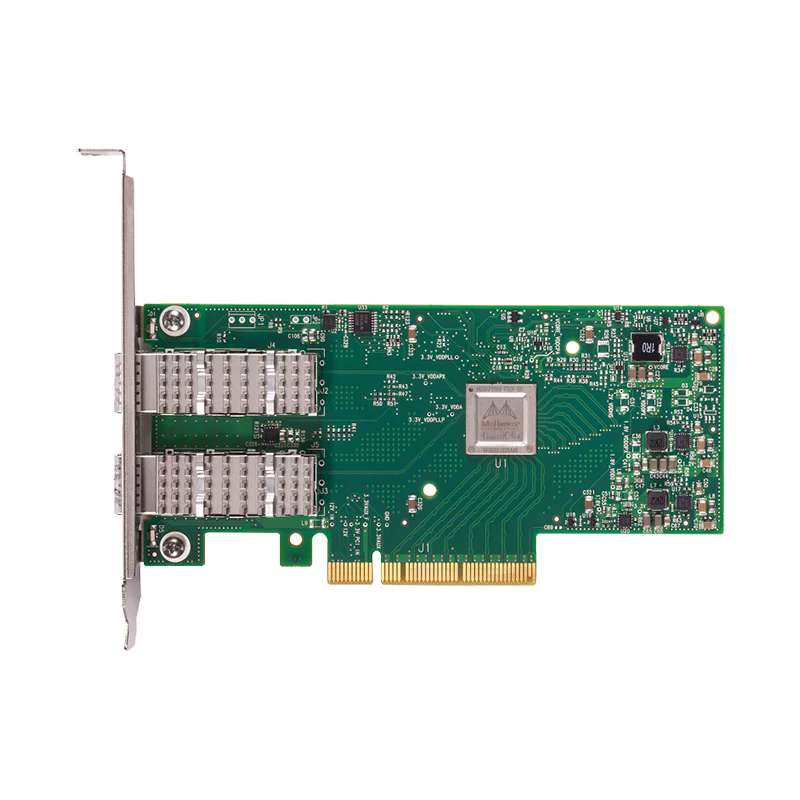
Table of Contents
- What Are Network Cards?
- Why Are Network Cards Important?
- How Do Network Cards Work?
- What Types of Network Cards Are Available?
- Which Network Card Specifications Matter Most?
- How Can You Choose the Right Network Card?
- Where Are Network Cards Used?
- How Should Network Cards Be Installed?
- What Common Problems Affect Network Card Performance?
- Network Card Selection Comparison
- Frequently Asked Questions
- Final Considerations
Article Outline
- Understand the basic function of a network card.
- Identify the relationship between network interfaces and system performance.
- Compare common network card technologies and interfaces.
- Evaluate bandwidth, latency, compatibility, and reliability requirements.
- Select hardware based on actual network workload rather than headline specifications.
- Install and configure network cards correctly.
- Avoid common causes of connectivity and throughput problems.
What Are Network Cards?
A network card, commonly called a Network Interface Card or NIC, is a hardware component that enables a computer, server, workstation, or other compatible device to connect to a network. It provides an interface between the host system and the physical or logical network connection, allowing information to be transmitted and received.
In a wired environment, the network card typically communicates through Ethernet cabling and a compatible connector. Depending on the hardware design, a network card may support different Ethernet speeds, such as 1GbE, 10GbE, 25GbE, 40GbE, or higher-speed networking. The appropriate level depends on the application, switch infrastructure, server capabilities, and expected traffic.
Network cards are more than simple connection adapters. Modern models can include hardware acceleration and packet-processing capabilities that reduce the amount of networking work handled directly by the host processor. This can be particularly valuable in servers, virtualization environments, storage systems, and high-throughput applications.
Why Are Network Cards Important?
A network may contain high-performance switches, fast storage, powerful processors, and high-bandwidth connections, but an unsuitable network card can still become a bottleneck. This is why the NIC should be considered as part of the complete communication path rather than as an isolated component.
For example, a server processing large datasets may need substantially more network bandwidth than a standard office workstation. Similarly, virtualization hosts may have many virtual machines sharing the same physical interface. Storage systems can also generate sustained traffic that places different demands on a network adapter than ordinary web browsing.
- Higher throughput: Suitable network cards can support faster data transmission between connected systems.
- Lower communication overhead: Hardware-assisted processing can reduce networking workload on the main CPU.
- Better scalability: Higher-speed interfaces can support growing traffic requirements.
- Improved reliability: Enterprise-oriented hardware can provide features designed for continuous operation.
- Flexible deployment: Different interfaces and form factors allow network connectivity to be matched to different systems.
How Do Network Cards Work?
When an application needs to send information across a network, data is passed through the operating system's networking stack and ultimately delivered to the network interface. The network card prepares the information for transmission according to the relevant networking protocols and physical interface requirements.
On the receiving side, the network card detects incoming data, processes the relevant frames and packets, and transfers the information into system memory for further handling by the operating system and applications.
The process may appear simple from the user's perspective, but high-speed network communication involves multiple layers of hardware and software coordination. Drivers, firmware, PCIe communication, memory buffers, Ethernet controllers, operating-system networking functions, and network switches can all influence actual performance.
Modern network cards may also support features such as checksum offloading, receive-side scaling, interrupt moderation, virtualization functions, and other acceleration mechanisms. These features are particularly useful when a system needs to handle substantial packet rates or multiple simultaneous connections.
What Types of Network Cards Are Available?
Network cards can be categorized according to their connection technology, physical interface, speed, intended application, and system architecture. Understanding these differences makes it easier to avoid purchasing hardware that cannot deliver the required result.
| Network Card Type | Typical Use | Key Consideration |
|---|---|---|
| Standard Ethernet NIC | Office PCs, workstations, general servers | Speed and operating-system compatibility |
| High-Speed Ethernet NIC | Servers, data centers, storage | Bandwidth, latency, PCIe capability |
| Multi-Port NIC | Servers, network appliances, virtualization | Port management and aggregate throughput |
| Fiber Network Adapter | Data centers and long-distance links | Transceiver and fiber compatibility |
| Server-Class NIC | Enterprise servers and critical workloads | Reliability, driver support, offloading features |
Which Network Card Specifications Matter Most?
Buyers often focus on advertised speed, but several specifications should be evaluated together. A network card is only useful when its capabilities match the rest of the system.
Interface bandwidth is one of the first factors to evaluate. Installing a high-speed NIC into a system that cannot provide enough PCIe bandwidth, suitable cabling, or a compatible switch connection may prevent the expected performance from being achieved.
Port configuration also matters. A single-port adapter may be appropriate for a basic workstation, while a server may benefit from multiple network interfaces for traffic separation, redundancy, virtualization, or network management.
Driver and operating-system support should never be overlooked. Hardware compatibility is not limited to whether the card fits physically into a slot. The operating system must recognize the controller and provide appropriate drivers and firmware support.
Latency becomes especially important in applications where rapid communication matters. Financial systems, real-time processing, distributed computing, high-performance storage, and some industrial workloads can have different latency requirements from ordinary office applications.
Thermal characteristics are another consideration for high-speed network adapters. Higher data rates and sustained workloads can generate additional heat, making adequate airflow and system cooling important for long-term stability.
How Can You Choose the Right Network Card?
The best network card is not necessarily the most expensive or fastest model. It is the model that provides the required connectivity, performance, compatibility, and reliability for the actual application.
- Define the workload. Determine whether the system handles ordinary office traffic, file transfers, virtualization, database traffic, video, storage, cloud workloads, or high-volume data processing.
- Check the existing network. Verify switch port speed, cabling, transceivers, network topology, and supported protocols.
- Verify the host interface. Confirm available PCIe slots, lane configuration, physical clearance, power requirements, and system compatibility.
- Confirm software support. Check operating-system versions, drivers, firmware, virtualization support, and management tools.
- Consider future expansion. If network traffic is expected to grow, choosing an adapter with additional capacity can reduce the need for an early hardware replacement.
- Evaluate the complete cost. The total investment may include NICs, switches, cables, optical modules, installation, configuration, and maintenance.
Where Are Network Cards Used?
Network cards are used across a broad range of computing and communication environments. Their requirements vary significantly depending on the role of the connected device.
- Enterprise servers: Network adapters connect servers to internal networks, storage systems, users, and external services.
- Data centers: High-speed NICs help support large volumes of east-west and north-south network traffic.
- Cloud infrastructure: Network interfaces allow physical and virtual resources to exchange data efficiently.
- Network storage: Storage platforms rely on reliable network communication for file and block-level data access.
- Workstations: Professional workstations may require higher-speed connections for large media files, engineering data, scientific workloads, and centralized storage.
- Virtualization: A capable NIC can support communication for multiple virtual machines running on the same physical host.
- Industrial computing: Network adapters can connect control computers, monitoring systems, data collection equipment, and industrial servers.
How Should Network Cards Be Installed?
Correct installation is essential for achieving stable network performance. Before installation, shut down the host system according to the manufacturer's instructions and confirm that the selected slot and operating environment are appropriate.
After physically installing the card, connect the appropriate network cable or optical module and start the system. The operating system should then detect the hardware or allow the administrator to install the appropriate driver.
Configuration should include IP addressing, link speed where applicable, duplex settings, VLAN configuration when required, and other network parameters. Enterprise environments may also require firmware updates and specific adapter settings for virtualization or traffic management.
Once configuration is complete, verify the connection rather than assuming successful installation. Check link status, negotiated speed, packet errors, system logs, and actual throughput. A short functional test can identify many installation problems before the system enters production.
What Common Problems Affect Network Card Performance?
Network performance problems are not always caused by the network card itself. Troubleshooting should therefore follow the complete communication path.
| Problem | Possible Cause | Recommended Check |
|---|---|---|
| Low throughput | Insufficient link speed, hardware bottleneck, configuration issue | Check negotiated speed and end-to-end bandwidth |
| Frequent disconnections | Driver, cable, port, power, or thermal issue | Inspect logs, cables, drivers, and system temperature |
| High latency | Network congestion or unsuitable configuration | Test latency across different network paths |
| Card not detected | Slot, driver, firmware, or compatibility problem | Check BIOS/UEFI, operating system, drivers, and PCIe installation |
| Unexpected packet errors | Cable, transceiver, port, configuration, or hardware issue | Inspect physical links and interface statistics |
Network Card Selection Comparison
| Requirement | Basic Network Environment | Enterprise Environment | High-Performance Environment |
|---|---|---|---|
| Primary priority | Compatibility and value | Reliability and manageability | Bandwidth and latency |
| Port requirement | Usually one | One or multiple | Multiple or high-speed ports |
| Traffic level | Light to moderate | Moderate to heavy | Heavy and sustained |
| Advanced features | Basic networking | Virtualization and management features | Offloading and performance optimization |
Frequently Asked Questions
What is the main purpose of a network card?
The primary purpose of a network card is to provide a network interface that allows a computer or other compatible device to communicate with other systems. It handles the transmission and reception of network data and works with the operating system and network infrastructure.
Can a network card improve internet speed?
A network card can remove a local hardware limitation when the existing adapter cannot support the available network connection. However, it cannot independently make an internet service faster than the bandwidth provided by the service, network infrastructure, and other system components.
Is a high-speed network card always better?
Not necessarily. A higher-speed adapter is useful only when the host system, switch, cabling, transceiver, software, and application can take advantage of the additional capacity. Selecting hardware that matches the actual workload is usually more practical than simply choosing the highest available speed.
Can one server use multiple network cards?
Yes. Servers can use multiple network interfaces for purposes such as network segmentation, redundancy, traffic distribution, management networks, virtualization, and additional bandwidth. The exact configuration depends on the operating system and network architecture.
What should I check before buying a network card?
Check the required data rate, physical interface, PCIe compatibility, connector or transceiver type, operating-system support, driver availability, port count, power and thermal requirements, network switch compatibility, and expected workload.
Are network cards useful for data centers?
Yes. Network cards are fundamental components in data-center servers and networking systems. Data-center workloads often require high throughput, predictable performance, reliable operation, and features that support virtualization, storage traffic, and large numbers of network connections.
How can businesses select a suitable network card supplier?
Businesses should evaluate product compatibility, available network technologies, manufacturing capability, technical support, documentation, quality control, delivery capability, customization options, and after-sales service. For projects involving multiple systems, supplier experience and technical communication can be as important as the hardware specification itself.
Final Considerations
Network cards are essential components in modern computing infrastructure because they establish the communication path between devices and the network. Their influence extends beyond basic connectivity: the selected adapter can affect bandwidth, latency, CPU utilization, scalability, reliability, and the ability of a system to support future workloads.
The most effective purchasing strategy is to begin with the actual application rather than a product name or headline speed. Analyze the network architecture, host system, switch capacity, cabling, software environment, traffic patterns, and future requirements before selecting the appropriate network card.
Telefy Telecommunications Equipment Co., Ltd. provides network hardware solutions for different computing and communication requirements. Whether the application involves servers, workstations, data-center infrastructure, storage, virtualization, or other network-connected systems, careful product selection can help create a more stable and scalable communication environment.
Build a More Reliable Network Infrastructure
If you are evaluating Network Cards for a new system, upgrading existing infrastructure, or looking for a suitable solution for a specific application, discuss your requirements with Telefy Telecommunications Equipment Co., Ltd. Share your expected network speed, host system, interface requirements, workload, and deployment environment to identify a suitable configuration. For product information, technical assistance, or customized requirements, please contact us and let our team help you find the right network connectivity solution.