

How Can the Mellanox MMA4Z00-NS Improve 800G Data Center Connectivity?
2026-10-28
Article Summary
The Mellanox MMA4Z00-NS is an 800Gb/s twin-port OSFP optical transceiver designed for high-bandwidth data center networking. Its architecture supports two 400Gb/s optical ports, making it relevant to high-performance computing, AI infrastructure, and demanding switch-to-switch connections. However, successful deployment requires more than matching the headline data rate. Buyers must confirm the OSFP form factor, optical connector type, multimode fiber grade, transmission distance, cooling requirements, and compatibility with the intended networking platform. This guide explains the module's main specifications, deployment considerations, troubleshooting steps, and procurement checklist to help network engineers, system integrators, and IT purchasing teams make informed decisions.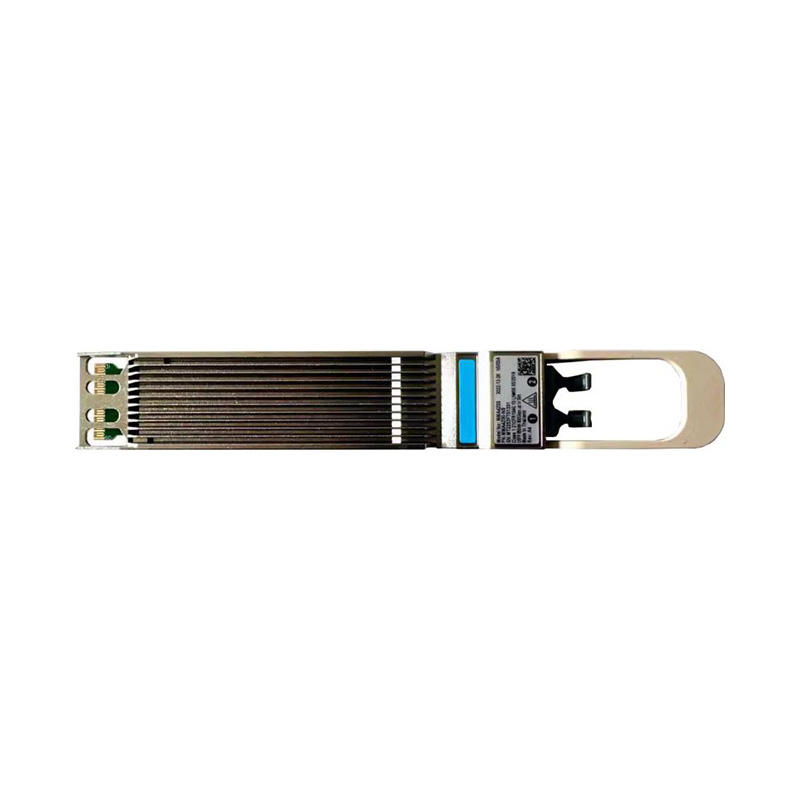
What Is the Mellanox MMA4Z00-NS?
The Mellanox MMA4Z00-NS is an 800Gb/s twin-port OSFP optical transceiver developed for high-speed network environments. It uses short-reach multimode optical technology and is associated with NVIDIA networking platforms used in data centers, high-performance computing (HPC), and large-scale computing infrastructure.
As AI workloads, distributed training, and data-intensive applications increase traffic between servers and switches, network operators need interconnects that deliver substantial bandwidth without creating unnecessary cabling complexity. An 800G optical module can help address these requirements when it is deployed within a compatible network design.
The MMA4Z00-NS is not simply a generic 800G module. Its twin-port design, OSFP form factor, multimode optics, connector arrangement, and cooling configuration all affect where it can be installed. Buyers should identify the exact part number and target platform before ordering.
For product-specific information, consult the official NVIDIA MMA4Z00-NS specifications and confirm that the selected hardware matches your equipment configuration.
Key Mellanox MMA4Z00-NS Specifications at a Glance
The following table summarizes the main product characteristics to review during system design and purchasing. Confirm the current official documentation and hardware-specific requirements before final deployment.
| Parameter | Specification | Why It Matters |
|---|---|---|
| Model | MMA4Z00-NS | Identifies the intended optical module |
| Aggregate data rate | 800Gb/s | Provides high aggregate link capacity |
| Port architecture | 2 × 400Gb/s | Supports a twin-port optical arrangement |
| Form factor | OSFP, finned-top configuration | Must match the host cage and cooling design |
| Optical technology | Multimode SR8 | Designed for short-reach multimode links |
| Wavelength | 850nm | Must match the specified optical system |
| Optical connectors | 2 × MPO-12/APC | Connector type and polish must match the link |
| Maximum reach | Up to 50m under specified conditions | Depends on fiber grade and channel design |
| Operating case temperature | Check the applicable NVIDIA specification | Thermal conditions affect reliable operation |
| Typical applications | High-performance data center networking | Supports demanding interconnect requirements |
Specifications are provided as a practical overview. Refer to the official product documentation for the exact environmental limits, electrical requirements, optical budgets, supported platforms, and regulatory details applicable to your module.
How Does the 800G Twin-Port Architecture Work?
The MMA4Z00-NS combines two 400Gb/s optical ports within one OSFP module. This architecture allows a compatible networking system to accommodate substantial aggregate bandwidth while using a single module position.
Two 400G Optical Ports
Each optical port carries a nominal 400Gb/s data rate. Together, the two ports provide 800Gb/s of aggregate capacity. The two-port architecture should be understood in the context of the host device and the supported link configuration rather than as a guarantee that every switch will expose the ports in the same way.
Parallel Multimode Optics
SR8 optical transmission uses parallel optical lanes and 850nm multimode technology. The optical interface relies on the correct fiber arrangement, connector type, and polarity. A cable that physically fits is not necessarily wired correctly for the intended link.
High-Density Network Design
In a high-density data center, module choice affects port capacity, cable routing, thermal management, and serviceability. Using the correct 800G module can help network designers meet bandwidth targets while maintaining a structured approach to rack-level cabling and maintenance.
Where Is the Mellanox MMA4Z00-NS Used?
AI Infrastructure and GPU Clusters
AI training systems exchange large volumes of data between compute nodes. High-bandwidth interconnects are therefore important for building scalable network fabrics. The MMA4Z00-NS may be relevant in supported NVIDIA networking environments where its port architecture, reach, and thermal design meet the system requirements.
High-Performance Computing
HPC clusters rely on efficient communication between processors, accelerators, storage systems, and switches. Optical modules are one part of the end-to-end design, alongside switch capabilities, network adapters, protocol support, and the physical fiber channel.
Data Center Switch Interconnects
Switch-to-switch links may require high aggregate throughput to prevent network oversubscription. The MMA4Z00-NS can be considered for short-reach links when both endpoints and the complete optical channel are designed to support the relevant configuration.
Enterprise and Cloud Infrastructure
Organizations expanding high-performance storage, cloud computing, and accelerated workloads may need to increase network capacity. The correct optical module can contribute to that upgrade, but the decision should also account for the existing switching platform, cable plant, power budget, and future maintenance requirements.
In all cases, application suitability depends on the exact system configuration. Confirm platform qualification and supported protocols rather than assuming that an 800G data rate alone establishes compatibility.
How to Check Compatibility Before Installing an MMA4Z00-NS
Compatibility problems can cause delayed deployment, unstable links, or unnecessary procurement costs. A structured pre-purchase review is more efficient than discovering a mismatch after the equipment has arrived.
Confirm the Host Equipment
Identify the exact switch or networking device model, hardware revision, port type, and supported optical modules. Check the vendor's compatibility documentation for the specific OSFP variant and its intended cooling environment.
Verify the Network Protocol
InfiniBand and Ethernet deployments can have different platform and configuration requirements. Confirm the intended operating mode, switch software support, and endpoint capabilities before selecting the transceiver.
Check the Physical Form Factor
An OSFP module must fit the intended cage and satisfy the platform's mechanical and thermal requirements. Do not substitute a QSFP-DD, QSFP112, or another OSFP variant simply because its data rate appears similar.
Confirm Cooling Requirements
Finned-top and flat-top OSFP modules may be intended for different cooling arrangements or equipment platforms. The MMA4Z00-NS finned-top variant should not automatically be treated as interchangeable with a flat-top variant. Confirm the required part number for air-cooled, liquid-cooled, or other platform-specific configurations.
Check Vendor Coding and Support Policies
Some networking platforms validate transceiver identification, firmware information, or supported module lists. Ask the hardware vendor or supplier to confirm whether the offered module is genuine, correctly identified, and supported for your specific equipment. For third-party alternatives, request explicit compatibility information rather than relying on a general compatibility claim.
Fiber, Connectors, and Transmission Distance
Optical channel design is a major factor in successful 800G deployment. Even when the module and switch are correct, an unsuitable fiber type, connector, or polarity can prevent the link from coming up.
Multimode Fiber Requirements
The MMA4Z00-NS uses 850nm multimode optics. Its specified maximum reach is up to 50 meters under applicable conditions, including the required multimode fiber grade and channel design. OM4 is commonly associated with the 50-meter SR8 application, while OM3 installations may have a shorter supported reach. Always verify the exact reach table in the current official documentation.
MPO-12/APC Connectors
The module uses two MPO-12/APC optical connectors. Buyers must confirm connector type, gender, polarity, fiber mapping, and the compatibility of patch panels and trunk cables. A visually similar MPO connector with a different polish or wiring arrangement may not be suitable.
Understand the Complete Optical Channel
Reach depends on more than the distance printed in a product listing. Fiber attenuation, connector insertion loss, patch panels, splices, and the total channel loss all affect performance. A channel that exceeds the supported optical budget may produce intermittent errors even if its physical length appears acceptable.
- Confirm the fiber category and actual link distance.
- Match the MPO connector type and polish.
- Verify Tx/Rx mapping and end-to-end polarity.
- Inspect patch panels and intermediate connections.
- Keep optical connectors clean and use appropriate inspection tools.
- Check the full channel loss against the vendor's requirements.
Installation and Troubleshooting Guide
When an optical link fails to initialize, use a consistent diagnostic process. Avoid replacing multiple components simultaneously because doing so makes it harder to identify the actual cause.
Step 1: Verify the Module and Port
Confirm that the transceiver is fully seated, the port is enabled, and the module is supported by the host device. Check the equipment's system logs and module inventory information for warnings, unsupported-module messages, or temperature alerts.
Step 2: Inspect the Optical Path
Check both MPO connectors, cable routing, polarity, fiber mapping, and patch-panel connections. Clean and inspect optical end faces using approved tools and procedures. Never look directly into an optical port or fiber end.
Step 3: Review Link Configuration
Verify the configured port mode, supported speed, protocol, and network software version. Confirm that both endpoints are configured for compatible operation. Check that the remote module and its host platform support the intended link configuration.
Step 4: Review Diagnostic Information
Where supported, digital diagnostic monitoring can provide information about temperature, supply voltage, transmit optical power, and receive optical power. Compare these readings with the product's applicable limits. Low receive power may indicate a dirty connector, incorrect polarity, a damaged cable, excessive channel loss, or a faulty component.
Step 5: Isolate the Fault
If the problem remains, test one known-good, compatible component at a time and record the results. Follow the platform vendor's procedures before moving a transceiver between ports or devices. Escalate persistent alarms or abnormal optical readings to qualified network support personnel.
How to Buy the Right Mellanox MMA4Z00-NS Module
For data center operators, resellers, and system integrators, procurement accuracy is just as important as technical performance. A clear request for quotation helps suppliers identify the right hardware and reduces the risk of ordering an incompatible variant.
Define the Exact Part Number
Specify MMA4Z00-NS and confirm the required top style, hardware variant, and platform application. If the equipment requires a different variant, document that requirement explicitly rather than relying on the model family name alone.
Request Product and Traceability Information
Ask whether the unit is new, used, refurbished, or an alternative compatible product. For genuine OEM products, request appropriate labeling, serial identification, packaging information, and available traceability documentation. Any supporting evidence should correspond to the actual unit being supplied.
Compare Total Procurement Cost
Unit price is only one component of the purchasing decision. Consider shipping, lead time, warranty conditions, return policies, technical support, and the cost of a failed or incompatible deployment. For large orders, clarify stock allocation and whether all units will meet the same specification.
Request a Written Quotation
A useful quotation should identify the product, condition, quantity, unit price, currency, shipping terms, estimated dispatch date, warranty, and applicable return conditions. Buyers managing critical infrastructure should also clarify the process for handling defective or misidentified products.
- Exact model: Mellanox MMA4Z00-NS
- Host switch or platform model
- Required quantity and delivery destination
- Required product condition and authenticity documentation
- Fiber type, connector arrangement, and link distance
- Target delivery date and warranty expectations
- Required compatibility confirmation and test records
Choosing a Reliable Networking Hardware Supplier
Reliable sourcing requires a supplier that understands the difference between product-family similarity and actual platform compatibility. This is particularly important for high-speed optical modules, where small differences in form factor, cooling design, or optical interface can affect deployment.
When evaluating a supplier, review the clarity of its product descriptions, the consistency of its part-number information, the availability of relevant documentation, and the process used to resolve product issues. Ask for written confirmation of the specific model and variant being quoted.
Telefly Telecommunications Equipment Co., Ltd. supplies networking and computer hardware for international customers. Buyers can visit the company's official website to review its product range and contact its team regarding availability and purchasing requirements.
The Telefly Mellanox MMA4Z00-NS product page provides a starting point for product inquiries. Before placing an order, confirm the exact 800G twin-port OSFP specification, the physical variant, product condition, platform compatibility, stock status, warranty, and delivery arrangements directly with the supplier.
For enterprise deployments, a clear quotation and a documented compatibility review are useful safeguards. They help purchasing teams compare offers accurately and give technical teams the information needed to prepare installation and acceptance testing.
Frequently Asked Questions About Mellanox MMA4Z00-NS
1. What is the data rate of the Mellanox MMA4Z00-NS?
The MMA4Z00-NS is an 800Gb/s twin-port OSFP optical transceiver, with two 400Gb/s optical ports. Actual system operation depends on supported host hardware and the configured network architecture.
2. What type of fiber does the MMA4Z00-NS use?
It uses 850nm multimode SR8 optics. The fiber grade, connector arrangement, polarity, and optical channel loss must meet the requirements specified for the deployment.
3. What is the maximum transmission distance?
The commonly specified maximum reach is up to 50 meters under the applicable conditions. The supported distance depends on the multimode fiber grade and the complete optical channel. Verify the official reach specifications before installation.
4. Which optical connectors are used?
The module uses two MPO-12/APC optical connectors. Check connector polish, gender, polarity, and fiber mapping before connecting the module to a trunk cable or patch panel.
5. Can the MMA4Z00-NS be installed in any 800G switch?
No. An 800G data rate does not guarantee compatibility. The host must support the OSFP form factor, specific module variant, cooling requirements, optical interface, and intended protocol. Consult the platform's compatibility documentation.
6. Is the MMA4Z00-NS the same as a 400G QSFP-DD transceiver?
No. The MMA4Z00-NS is an 800Gb/s twin-port OSFP module with two 400Gb/s optical ports. A 400G QSFP-DD module has a different form factor and product architecture and should not be treated as interchangeable.
7. What should buyers check before ordering?
Confirm the exact part number, module variant, host platform, product condition, optical requirements, quantity, delivery schedule, warranty, and return conditions. Request relevant documentation and written compatibility confirmation where necessary.
8. How can buyers request a quotation from Telefly?
Visit the Telefly product page or company website and provide the required model, quantity, target platform, delivery destination, and purchasing requirements. Confirm current stock, pricing, product condition, warranty, and shipping details with the sales team.
Source Mellanox MMA4Z00-NS Modules with Telefly
Planning an 800G network upgrade for an AI cluster, HPC environment, or data center? Telefly Telecommunications Equipment Co., Ltd. can be contacted to discuss your networking hardware sourcing requirements.
Share your target model, host platform, required quantity, delivery schedule, and compatibility needs to help clarify the product specification before purchase.
Contact Us for Product DetailsConfirm exact part number, product condition, compatibility, availability, warranty, and delivery terms before placing an order.