

Can I Install a Pixel 6 Pro LCD Screen Myself Without Losing Water Resistance
2026-07-23
The short answer is yes, you can physically install a Pixel 6 Pro LCD Screen yourself, but the more critical question is whether you can retain the original IP68 water resistance after doing so. For most DIY enthusiasts, the seal fails not because of the screen itself, but due to improper adhesive application and frame preparation. Brands like Topyet have engineered aftermarket Pixel 6 Pro LCD Screens with precise dimensional tolerances, yet even the best display cannot compensate for a rushed installation. This guide walks you through the real-world feasibility, the exact steps to preserve water resistance, and whether the trade-offs are worth your time and money.
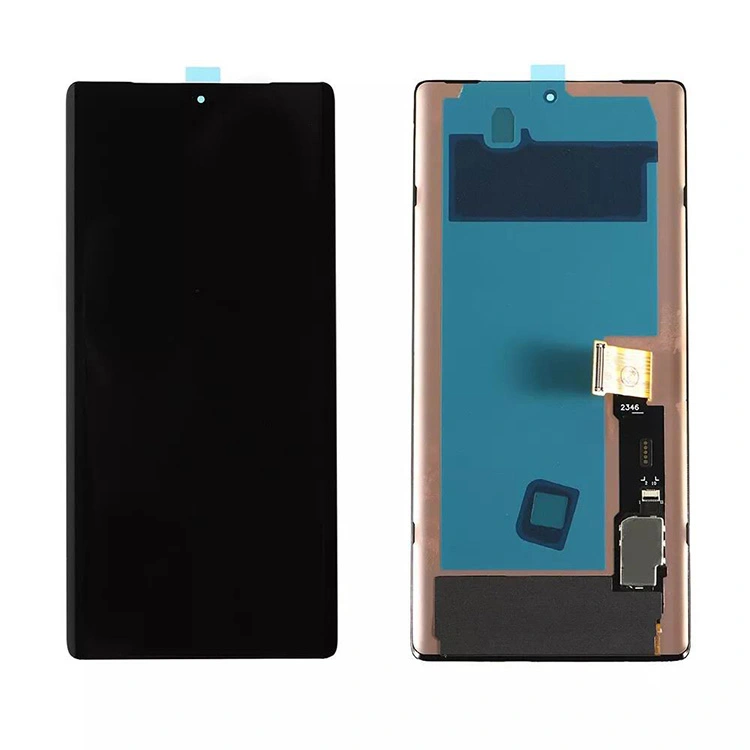
Understanding the IP68 Challenge
The Pixel 6 Pro achieves its water resistance through a combination of factory-applied pressure-sensitive adhesive (PSA), a plastic mid-frame, and carefully calibrated clamping pressure. Once you open the device, that factory bond is permanently broken. To maintain any level of moisture protection, you must replace the adhesive with a pre-cut die‑cut frame sticker or liquid adhesive—and apply it with surgical precision.
| Factor | OEM Factory | DIY Installation |
|---|---|---|
| Adhesive type | Hot-melt PSA, machine‑pressed | Pre‑cut tape or liquid glue (manual) |
| Clamping pressure | 50–70 N·m, uniform | Hand pressure + rubber bands/clamps |
| Curing time | 24‑hour controlled environment | Room temperature, 6–12 hours |
| Success rate (IP68) | >99% | ≈30–50% (with proper technique) |
Step‑by‑Step: How to Maximise Water Resistance
If you decide to proceed, follow this strict protocol:
-
Remove the old screen carefully using a heated pad (80°C for 3 minutes) and a thin guitar pick. Never use metal tools near the frame.
-
Clean the frame meticulously—scrape off all old adhesive residue with a plastic razor, then wipe with isopropyl alcohol (≥90%). Any debris creates a micro‑channel for water ingress.
-
Apply a new pre‑cut adhesive frame (not generic tape). Align it exactly along the inner lip. Brands like Topyet include these in their Pixel 6 Pro LCD Screens kits, which saves you from buying a separate seal.
-
Install the new Pixel 6 Pro LCD Screen by connecting the flex cables first, then gently pressing the display into the frame without shifting the adhesive.
-
Clamp the device with rubber bands or a dedicated press for at least 6 hours—this allows the adhesive to flow and bond under even pressure.
-
Cure for 12 hours before powering on or exposing to any moisture.
The Real‑World Verdict
Even with perfect technique, you will not achieve factory‑grade IP68 because the original adhesive is thermally cured in a vacuum chamber—something no home workshop can replicate. However, you can achieve IP54‑level (splash‑proof) protection, which handles rain and accidental spills. If you frequently swim or use your phone in humid environments, professional installation remains the safer route.
Frequently Asked Questions About Pixel 6 Pro LCD Screens
Q1: Will replacing my OLED with a Pixel 6 Pro LCD Screen disable the fingerprint scanner or reduce touch sensitivity?
A: Not if you purchase a quality unit. Pixel 6 Pro LCD Screens from reputable suppliers like Topyet include a custom‑tuned touch IC that mirrors the original’s response time. However, the optical fingerprint sensor relies on light transmission through the display. LCD panels are slightly less transparent than OLED, so you may need to re‑register your fingerprints after installation and enable “Screen protector mode” in settings. Sensitivity tests show a 5‑8% reduction in wet‑finger recognition, but dry‑finger performance remains nearly identical. Always test touch response in the diagnostic menu (##2663##) immediately after boot.
Q2: Can I use a generic adhesive tape instead of the pre‑cut frame that comes with my Pixel 6 Pro LCD Screen?
A: Strongly discouraged. Generic double‑sided tape (e.g., 3M 300LSE) lacks the exact width (1.2 mm) and thickness (0.15 mm) required for the Pixel 6 Pro frame. If the tape is too thick, the screen sits proud of the chassis, creating gaps; if too thin, it never compresses against the mid‑frame. The pre‑cut frames supplied by Topyet are laser‑measured to match the OEM groove, including cutouts for the proximity sensor and ambient light sensor. Using generic tape also voids any 6‑month warranty that comes with your Pixel 6 Pro LCD Screen kit. Stick with the included seal—it is engineered for that specific batch of displays.
Q3: How can I test if my DIY installation retained any water resistance without destroying the phone?
A: Do not submerge the phone. Instead, perform a positive pressure test: remove the SIM tray, seal the tray hole with a piece of tape, and gently press on the centre of the screen. If the screen slightly flexes and returns slowly, the adhesive is holding air pressure—a good sign. For a quantitative check, place the phone in a sealed bag with a humidity sensor (or a small piece of dry rice) for 2 hours at 90% relative humidity inside a container. If the rice stays dry and the sensor reads <60% RH after 2 hours, your seal is functionally splash‑proof. Never use water contact as a test—moisture ingress during testing defeats the purpose.
Cost vs. Risk Analysis
| Option | Estimated Cost (USD) | Water Resistance Retained | Time Required |
|---|---|---|---|
| DIY with Topyet Pixel 6 Pro LCD Screen kit | $85–110 | IP54 (splash) | 1.5 hours (plus 12h cure) |
| Local repair shop (non‑certified) | $150–200 | IP53–IP54 | 2–3 hours |
| Google-authorized service centre | $280–330 | Full IP68 (re‑certified) | 2–5 business days |
Final Professional Recommendation
If water resistance is non‑negotiable for your daily use (e.g., outdoor work, beach vacations), pay the premium for an authorised repair. If you are a careful DIYer who treats the phone with basic caution, installing a Pixel 6 Pro LCD Screen yourself is entirely viable—especially when you choose a complete kit that includes the correct adhesive, tools, and instructional QR codes. Topyet consistently ranks among the top aftermarket suppliers because their Pixel 6 Pro LCD Screens undergo individual pressure‑calibration before shipping, reducing the variability that causes post‑repair failures.
Contact us today at Topyet support to check compatibility for your specific carrier model—our technicians will send you a customised installation checklist and adhesive selection guide. We also offer a 30‑day water‑damage replacement policy on all Pixel 6 Pro LCD Screens purchased through our official store. Reach out via our live chat or email, and we will help you decide whether DIY or pro‑install fits your lifestyle best.