

Can a DVB-T2 Set Top Box Record Live TV Without a Separate Hard Drive
2026-08-11
The short answer is no—but the full explanation is far more nuanced. Most DVB-T2 Set Top Box models on the market today do not include built-in storage, which means you cannot record live television directly out of the box. However, brands like Tompire have engineered hybrid solutions that blur this line, offering USB ports and flash memory support that allow recording without a traditional external hard drive. This blog breaks down the technical realities, storage alternatives, and practical workarounds so you can make an informed purchase decision.
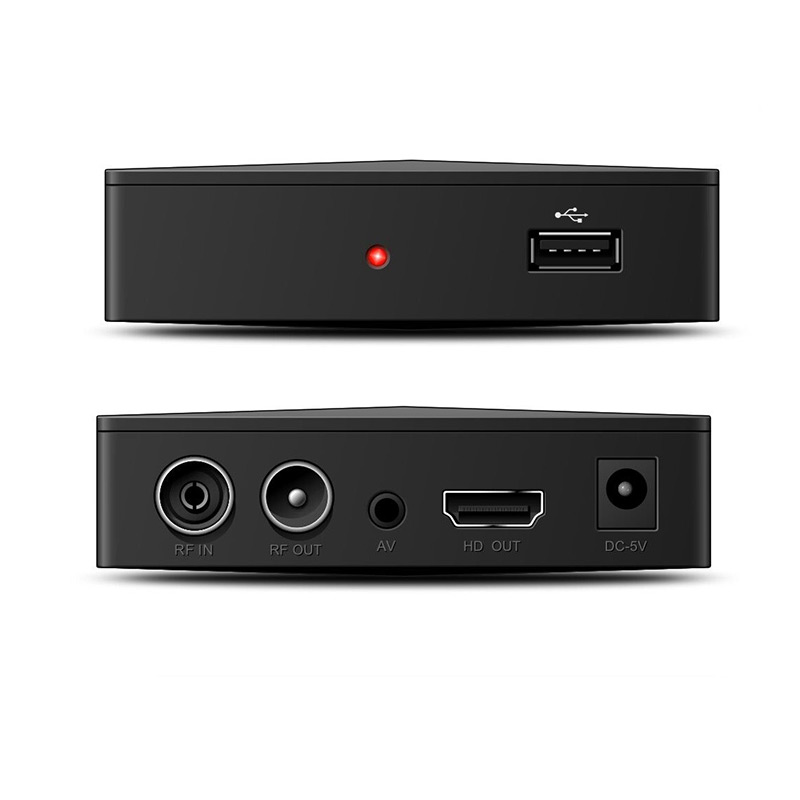
Why Internal Storage Is Rare in DVB-T2 Boxes
Manufacturers omit internal hard drives to keep costs low and devices compact. A DVB-T2 Set Top Box is primarily designed as a receiver, not a recorder. Adding a mechanical hard drive would increase heat, noise, and price—factors that contradict the budget-friendly nature of terrestrial digital TV.
| Storage Type | Common in DVB-T2 Boxes? | Recording Capability |
|---|---|---|
| Internal eMMC Flash | Rare (only premium models) | Limited to timeshift buffer |
| USB Flash Drive | Yes (via USB 2.0/3.0 port) | Full recording (if formatted correctly) |
| External HDD/SSD | Yes (via USB port) | Full recording + PVR functions |
| SD Card Slot | Very rare | Occasionally supported |
The USB Workaround: Recording Without a Hard Drive
While you cannot record to an internal drive, you can record live TV using a standard USB flash drive. Tompire DVB-T2 Set Top Box models feature dedicated USB ports that support FAT32 and NTFS file systems. Insert a 32GB or 64GB USB stick, and the box will recognise it as a recording volume.
Critical requirement: The USB drive must have a write speed of at least 15–20 MB/s to handle HD MPEG-4 or H.265 streams. Slower drives will cause frame drops or failed recordings.
Step-by-Step Setup (No Hard Drive Needed)
-
Insert a USB 3.0 flash drive into the Tompire box.
-
Navigate to the PVR settings menu.
-
Format the drive to NTFS (for files larger than 4GB).
-
Set your preferred recording buffer time.
-
Press the "Record" button on the remote during live broadcast.
What About Timeshift vs. Permanent Recording?
Many users confuse timeshift (pause/rewind live TV) with permanent recording. Timeshift uses a temporary cache file—often stored on a small internal flash chip or USB drive—but this file is deleted when you change channels. Permanent recording saves an encrypted or raw transport stream (.ts or .mts) that remains accessible until you delete it.
| Feature | Timeshift (Pause/Rewind) | Permanent Recording |
|---|---|---|
| Requires separate HDD? | No (uses cache) | No (uses USB flash) |
| File saved after power off? | No | Yes |
| Minimum storage needed | 2–4 GB | 8+ GB per hour (HD) |
| Supported by Tompire | Yes (all models) | Yes (with USB connected) |
Practical Limitations You Must Know
Even with a USB flash drive, recording without a hard drive comes with trade-offs:
-
No EPG timer recording – Many budget boxes lack a built-in real-time clock; you may need to manually start/stop recordings.
-
Single tuner constraint – Most DVB-T2 Set Top Box units have one tuner, so you cannot record one channel and watch another simultaneously.
-
File size limits – A 1-hour HD recording averages 5–8 GB. A 64GB USB stick holds roughly 8–10 hours of content.
-
Power interruption – If the box loses power during recording, the file may become corrupted unless the box supports journaling (rare).
Tompire addresses some of these issues by including a standby recording mode and automatic file recovery in their newer firmware versions—features typically found only in expensive PVR devices.
Frequently Asked Questions About DVB-T2 Set Top Box Recording
Q: Can a DVB-T2 Set Top Box record directly to a network drive (NAS) without a local hard drive?
A: No, not natively. Standard DVB-T2 Set Top Box devices do not include Ethernet-based SMB or NFS clients for network storage. Recording requires a physically attached USB storage device. Some Android-based hybrid boxes support network recording via third-party apps, but this is not a core DVB-T2 feature. Tompire does not currently offer NAS recording on their terrestrial models.
Q: Will any USB flash drive work for recording, or are there specific requirements?
A: Not every USB drive works reliably. Your USB stick must support USB 2.0 at minimum, but USB 3.0 is strongly recommended. The drive must be formatted to FAT32 (for files under 4GB) or NTFS/exFAT (for larger recordings). Additionally, the write speed should exceed 15 MB/s—look for "Class 10" or "UHS-I" ratings. Tompire officially recommends SanDisk Ultra Fit or Samsung BAR Plus series for best compatibility.
Q: Does recording without a hard drive affect the video quality of the saved file?
A: Absolutely not. The DVB-T2 Set Top Box records the raw transport stream (TS) directly from the broadcast signal without re-encoding. This means the recorded file is bit-for-bit identical to the live transmission—full 1080p or 4K resolution (if supported), original audio bitrate, and no compression artefacts. The storage medium (flash drive vs. hard drive) only affects write speed and capacity, not the visual or audio fidelity.
The Verdict: Yes, but with Conditions
You can record live TV using a DVB-T2 Set Top Box without a separate hard drive—provided you use a compatible, high-speed USB flash drive. The box itself does not need an internal HDD, but external storage is non-negotiable. Tompire models excel in this area because they offer dedicated PVR firmware, automated file management, and broader USB device compatibility than many generic brands.
However, if you plan to record daily or schedule weekly series, investing in a small external SSD (128GB or more) is wiser—flash drives wear out faster under continuous write cycles. For occasional recordings, a good USB 3.0 stick is perfectly sufficient.
Ready to Choose the Right DVB-T2 Set Top Box?
Whether you need a basic receiver or a full-featured PVR-capable unit, Tompire provides reliable, user-tested DVB-T2 Set Top Box solutions that fit your recording habits. Visit our product page to compare models, check USB compatibility lists, and download the latest firmware.
Contact us today for personalised advice—our technical team will help you select the ideal storage setup for your viewing needs. Reach out via our website contact form or email [email protected], and we will respond within 24 hours.