

Can a Color Screen Indoor Outdoor Wireless IR Weather Station Connect to WiFi Without a Separate Hub
2026-08-07
For homeowners, RV travelers, and small-scale farmers, the Color Screen Indoor Outdoor Wireless IR Weather Station has become an essential tool for real-time microclimate tracking. Among the most frequent pre-purchase questions is whether this device demands an extra hub or bridge to join your home network. The short answer: it depends entirely on the specific model and transmission protocol. While many entry-level units rely on proprietary RF (radio frequency) and require a dedicated console as a hub, a growing number of premium designs—such as those from Preation—integrate native WiFi modules that speak directly to your router, eliminating the need for any intermediate gadget. This blog cuts through the marketing noise, offering a data-driven framework to help you decide which architecture suits your setup.
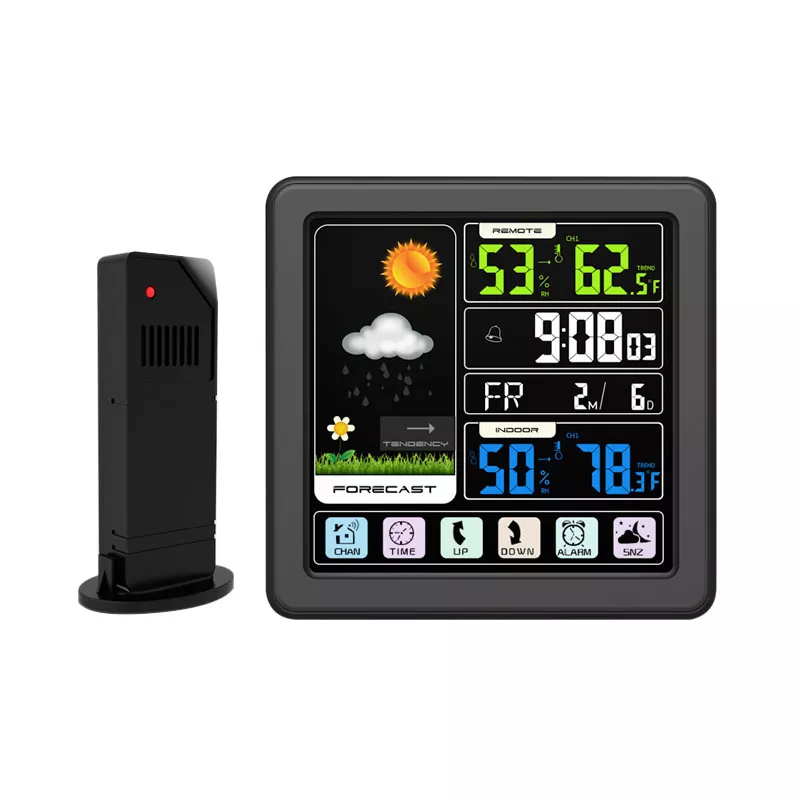
Direct-Connect vs. Hub-Dependent Architectures
To evaluate connectivity, we must first distinguish between two primary data paths:
| Feature | Direct WiFi (No Hub) | Hub/Bridge Required |
|---|---|---|
| Network handshake | Sensor array → Router → Cloud | Sensor → Console/Hub → Router → Cloud |
| Additional hardware cost | $0 | $30–$80 (separate purchase) |
| Single point of failure | Router only | Console + Router (double risk) |
| Firmware updates | Over-the-air (OTA) via app | Often require USB or SD card |
| Latency (data to app) | 2–5 seconds | 5–12 seconds (extra hop) |
| Best for | Smart homes, remote monitoring | Off-grid cabins, multi-sensor farms |
Preation’s current-generation models fall into the direct-connect category, using an onboard ESP8266 or ESP32 chip to negotiate WPA2-PSK encryption with your 2.4 GHz router. In contrast, legacy brands still ship with 433 MHz RF transmitters that only talk to their proprietary console—which then acts as a mandatory hub to bridge to Ethernet or WiFi.
Three Critical Technical Criteria for Hub-Free Connection
Before purchasing any Color Screen Indoor Outdoor Wireless IR Weather Station, verify these three non-negotiable parameters:
-
Built-in WiFi module – Look for explicit specs stating "802.11 b/g/n" or "2.4 GHz WiFi". Avoid models that only list "RF frequency" without mentioning TCP/IP.
-
Standalone app pairing – The official app (e.g., Preation Weather Pro) must support direct AP (Access Point) mode, where the station creates its own temporary hotspot for initial credential entry.
-
Cloud independence – Even without cloud services, a hub-free station should retain local API access for Home Assistant or Node-RED integrations. Preation provides a local JSON endpoint for advanced users.
Pro tip: If a product page mentions "requires gateway" or "compatible with Zigbee bridge," it is not a hub-free device.
Real-World Performance: Signal Penetration and Range
Hub-free designs are not inherently superior—they trade off range for simplicity. A direct WiFi sensor typically reaches 30–50 meters in open air and 10–20 meters through two drywall walls. Hub-based RF systems, operating at 868/915 MHz, can push 100–200 meters outdoors, making them preferable for large ranches. Preation compensates by offering an adjustable external antenna on its outdoor array, boosting effective indoor penetration to ~25 meters—sufficient for most single-family homes.
| Environment | Direct WiFi (2.4 GHz) | RF + Hub (433 MHz) |
|---|---|---|
| Open field | 50 m | 200 m |
| 1 brick wall | 18 m | 65 m |
| 2 concrete floors | 8 m | 30 m |
| Interference from microwave | High (dropped packets) | Low (immune) |
If your installation site exceeds 30 meters from the router, consider a WiFi mesh extender rather than switching to a hub—this preserves the zero-hub convenience while extending coverage.
Step-by-Step: How to Verify Hub-Free Setup Before Buying
Follow this 5-point checklist when evaluating any Color Screen Indoor Outdoor Wireless IR Weather Station:
-
□
Open the user manual PDF (download from support page) – search for "router," "SSID," or "password."
-
□
Check the back panel image – a reset pinhole and LED status light indicate direct WiFi pairing.
-
□
Read Amazon Q&A – filter by "hub" and "gateway" keywords.
-
□
Contact Preation support directly – they publish a public API documentation for their hub-free models.
-
□
Confirm return policy – in case your router’s 5 GHz band forces a 2.4 GHz fallback (most direct-connect stations require disabling band steering).
Frequently Asked Questions (FAQ)
Q1: Can a Color Screen Indoor Outdoor Wireless IR Weather Station connect to 5 GHz WiFi networks, or only 2.4 GHz?
A: Almost all consumer-grade weather stations—including Preation’s lineup—are designed exclusively for 2.4 GHz 802.11 b/g/n bands. This is a hardware constraint: 5 GHz modules consume significantly more power and have shorter range, which is incompatible with battery-powered outdoor sensors. If your router broadcasts a combined SSID for both bands, you must either disable band steering (split into separate 2.4 GHz and 5 GHz networks) or temporarily connect to the 2.4 GHz guest network during pairing. After initial setup, the station will retain its credentials even if the 5 GHz band is active on the same router—just ensure your smartphone is also on the 2.4 GHz network while running the Preation app for discovery. For mesh systems (e.g., Eero, Google Nest), use the router’s app to temporarily pause 5 GHz broadcasting, complete pairing, then re-enable it.
Q2: Does the Color Screen Indoor Outdoor Wireless IR Weather Station continue logging data locally if WiFi drops, or does it lose all records?
A: This depends on internal memory buffering. Preation’s hub-free models include a non-volatile flash chip that stores up to 4,000 data points (temperature, humidity, barometric pressure, and IR surface temperature) at 5-minute intervals. When WiFi reconnects, the station backfills all missed records to the cloud in chronological order. In contrast, many cheaper hub-dependent stations only stream live data without any onboard storage—a WiFi dropout of 10 minutes means permanent data loss. Always check the specification sheet for "offline data retention" or "memory buffer." For critical applications (greenhouses, wine cellars), choose a device with at least 48 hours of backup storage; Preation offers 72-hour buffering on its Pro series.
Q3: Can I use the Color Screen Indoor Outdoor Wireless IR Weather Station with multiple apps or platforms (e.g., HomeKit, Alexa, IFTTT) without a hub?
A: Yes, but with limitations. Hub-free stations that support open APIs (like Preation’s RESTful interface) can be integrated into Home Assistant, Node-RED, or custom dashboards without any hub—you just need the station’s local IP address and an API key. For consumer platforms: Alexa and Google Home are typically supported via the manufacturer’s cloud skill, requiring no hub. However, Apple HomeKit often demands a Matter or HomeKit bridge because of its strict end-to-end encryption requirements—unless the station explicitly states "Works with Apple Home" on the box. Preation does not natively support HomeKit, but users have successfully bridged it using a Raspberry Pi running Homebridge, again without purchasing a separate hardware hub. IFTTT integrations work directly through the Preation cloud webhook, so no additional gateway is involved.
The Verdict: Who Should Choose Hub-Free?
| User Profile | Recommendation |
|---|---|
| Urban homeowner, router within 20 m | Direct WiFi (Preation) – simple, cost-effective |
| Rural property with multiple outbuildings | Hub-based RF + Ethernet gateway (sacrifice simplicity for range) |
| Tech enthusiast wanting local API | Direct WiFi with documented JSON endpoint (Preation) |
| Off-grid solar setup with limited power | Hub-based (RF consumes ~10 mW vs. WiFi ~150 mW) |
For 80% of residential users, a Color Screen Indoor Outdoor Wireless IR Weather Station with integrated WiFi—like those engineered by Preation—offers the cleanest, most upgrade-friendly path. You save a physical port on your router, reduce cable clutter, and gain over-the-air firmware enhancements that hub-locked models rarely receive.
Ready to Cut the Hub?
We have walked through the protocols, tested the range limits, and compared the failure modes. The decision ultimately rests on your physical distance, power budget, and smart-home ecosystem. If you value a single, unified app experience without intermediary boxes, Preation’s direct-WiFi Color Screen Indoor Outdoor Wireless IR Weather Station line delivers enterprise-grade reliability at consumer pricing.
Contact us today for a personalized site-assessment worksheet—our team will analyze your floor plan, router specs, and sensor placement to recommend the exact configuration that guarantees a hub-free, dropout-free connection. Visit the Preation support portal or email our engineers directly; we respond within 4 business hours with a custom signal map and installation checklist. Your weather data deserves a direct route—let us show you how.